
Notes & team communication
Notes are how the office, caregivers and doctors share information about a patient: what to bring, what changed, what needs attention. Every note belongs to a patient and says who can read it.
Where notes come from
- The office writes notes on the patient's dashboard.
- Caregivers write notes from the Alivio mobile app during or after a visit.
- Doctors write notes and instructions from the doctor portal.
They all appear together in the Notes panel of the patient dashboard. Open it from Patients by clicking the patient's name.
Write a note
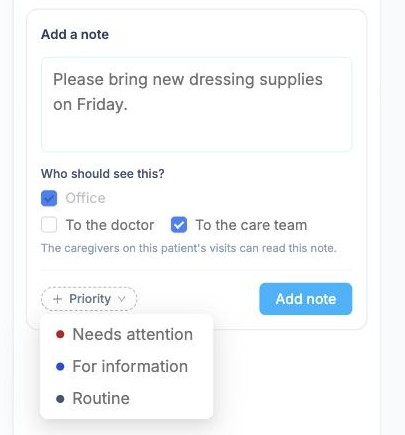
To add a note, write it under Add a note, then choose Who should see this?:
- Office: always ticked, so the office always sees it
- To the doctor: the patient's doctors can read it too
- To the care team: the caregivers visiting this patient can read it too
The line under the boxes tells you exactly who will be able to read it. Optionally set a Priority (Needs attention, For information or Routine) and click Add note.
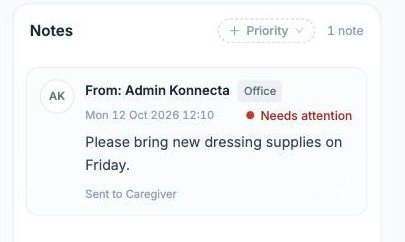
The note appears in the list with its author, date, priority and who it was sent to. Use Priority at the top of the panel to show, for example, only notes that need attention.
TIP
The people you send a note to also get a notification, so use Needs attention only for things that really need action.
Who gets notified
When a note is sent to the doctor or the care team, those people get a notification (in the bell at the top of the dashboard, or on their phone in the app). The author is never notified of their own note.